AI prompts for UI/UX designers

Written by

Sumit Verma
UI/UX Designer
Table of contents
Build with Radial Code
Share this


Artificial intelligence is rapidly transforming the way designers work. Tasks that once took hours of research, brainstorming, wireframing, and content creation can now be completed in minutes with the help of AI tools like ChatGPT, Claude, Gemini, Midjourney, and Figma AI.
However, the quality of AI-generated results depends heavily on one thing: the prompt.
A well-crafted prompt can help UI/UX designers generate user flows, design ideas, wireframes, user personas, usability insights, microcopy, design systems, and even complete product concepts. On the other hand, vague prompts often produce generic and unusable results.
The anatomy of a great AI prompt
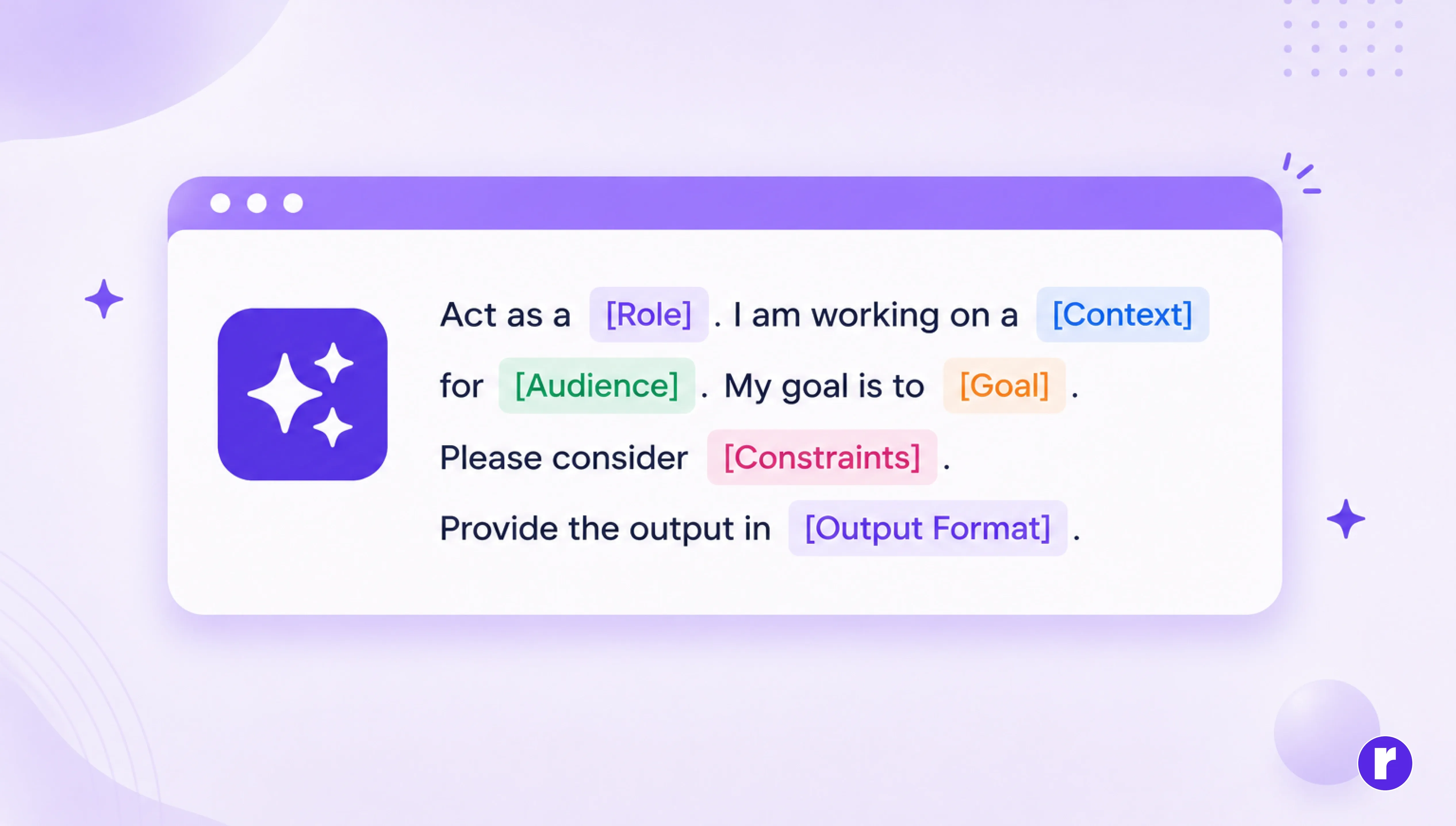
Use this formula for almost every design task:
Role + Context + Audience + Goal + Constraints + Output Format
- Role: Tell AI who it should act as.
- Context: Explain the project.
- Audience: Describe the users.
- Goal: Define success.
- Constraints: Provide limitations.
- Output format: Specify the expected result.
Output from AI using good vs bad prompt
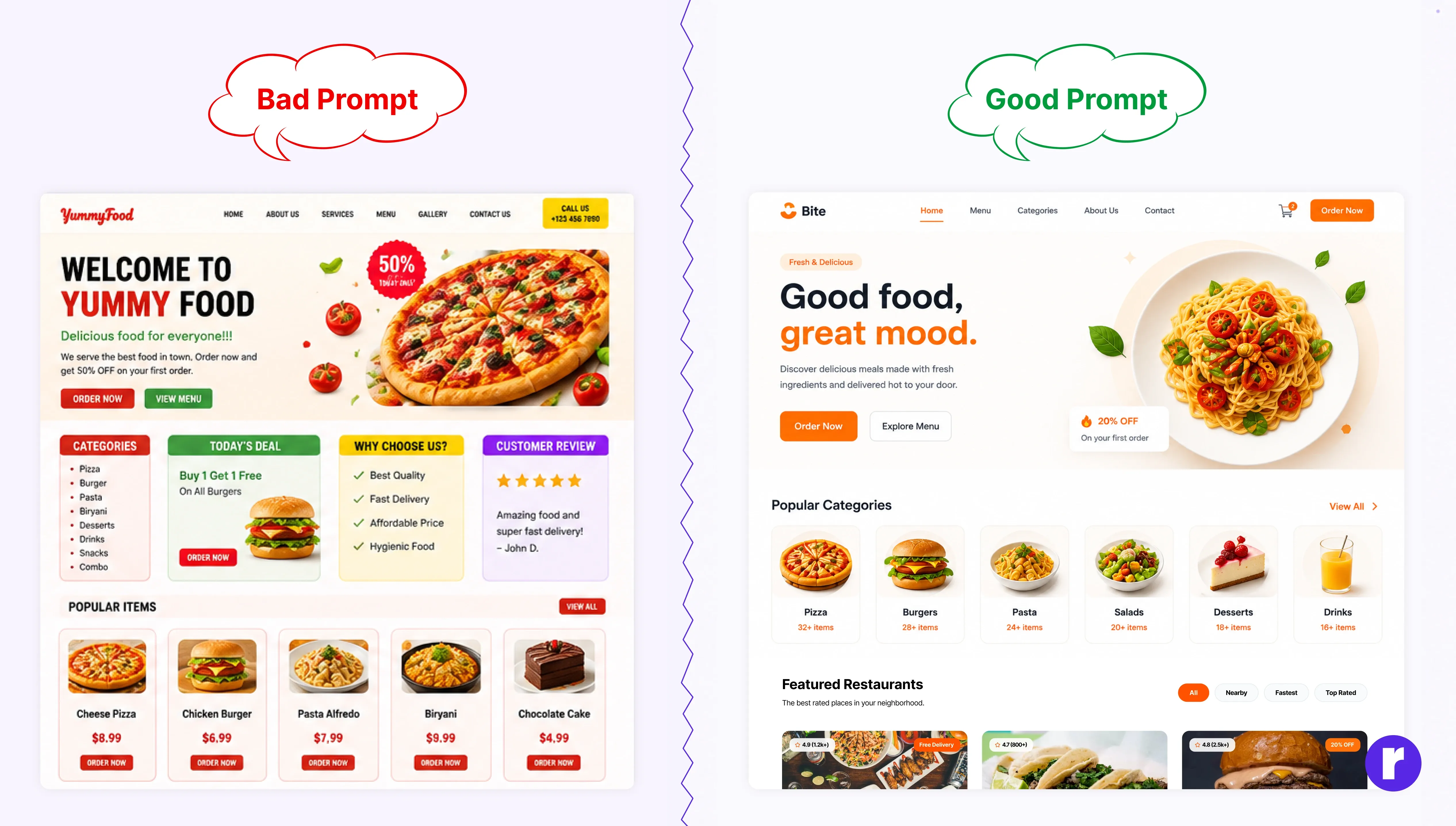
To understand the impact of prompt quality, compare the two examples above.
The bad prompt simply asks AI to
The good prompt provides clear context, audience details, goals, and design requirements. As a result, the AI creates a more structured, visually appealing, and user-focused homepage.
Prompt we use: “You are a senior UI/UX designer and need to design a modern food website landing page for food lovers who want to explore and order food online. Create a clean, appealing, and conversion-focused UI; use warm colors, modern typography, lots of white space, and mobile-responsive and high-fidelity UI design.”
Create user personas
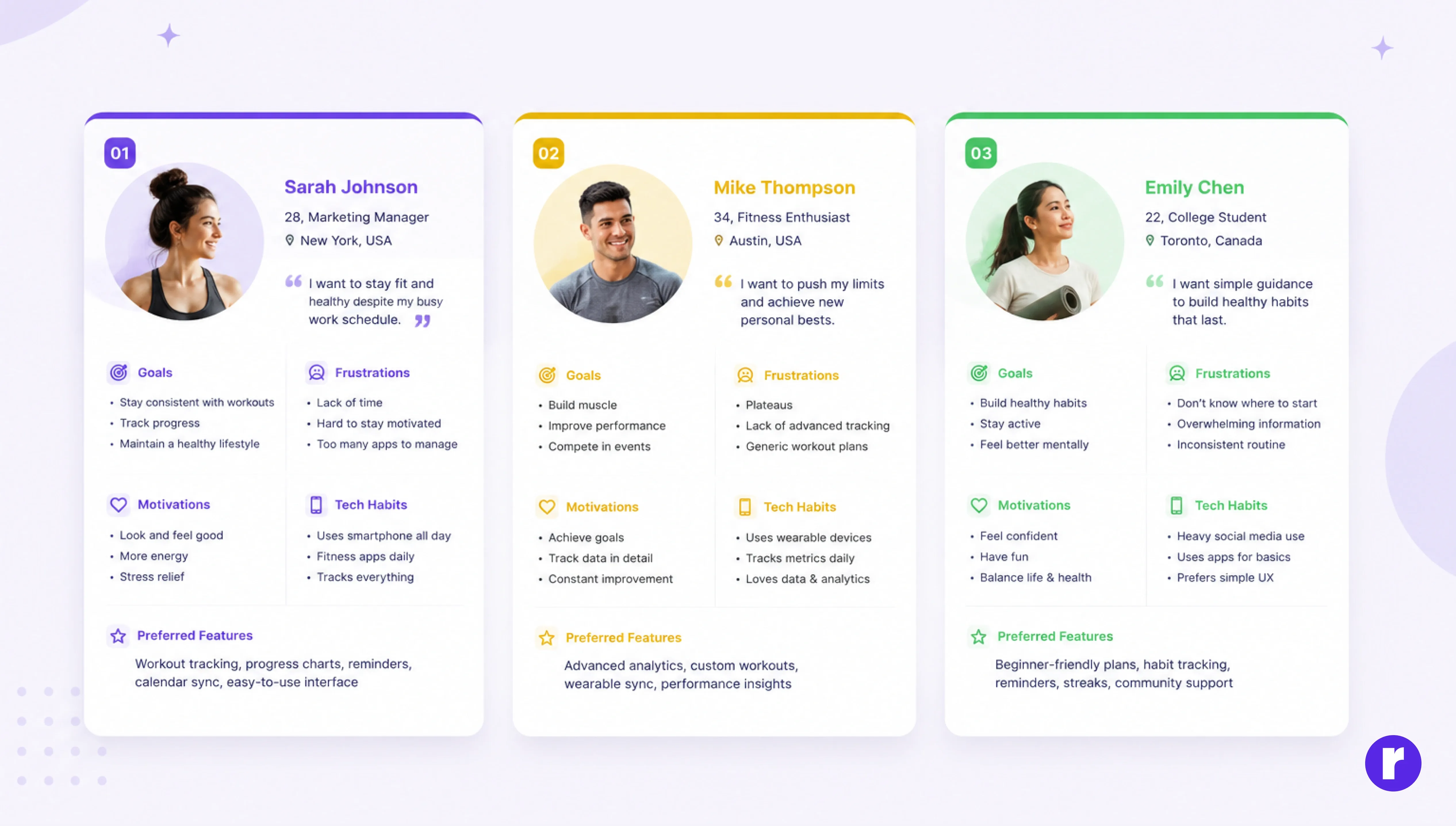
Every successful product begins with understanding its users. Yet creating personas from scratch can be time-consuming, especially during the early stages of a project.
AI can help designers quickly generate draft personas that can later be refined through actual user research.
Prompt used
- Role: Act as a senior UX researcher.
- Context: I am designing a fitness tracking mobile application that helps users track workouts, monitor progress, and stay motivated.
- Audience: Health-conscious adults aged 18–45, including beginners and experienced fitness enthusiasts.
- Goal: Create three realistic user personas that represent different user types and their needs.
- Constraints: Ensure each persona includes demographics, goals, frustrations, motivations, technology habits, and preferred features. Each persona should be distinct from the others.
- Output format: Present the personas in a structured card format with clear headings and bullet points.
💡 Pro Tip: AI-generated personas are a great starting point, but they should always be validated with real user research and feedback.
Create a homepage wireframe structure
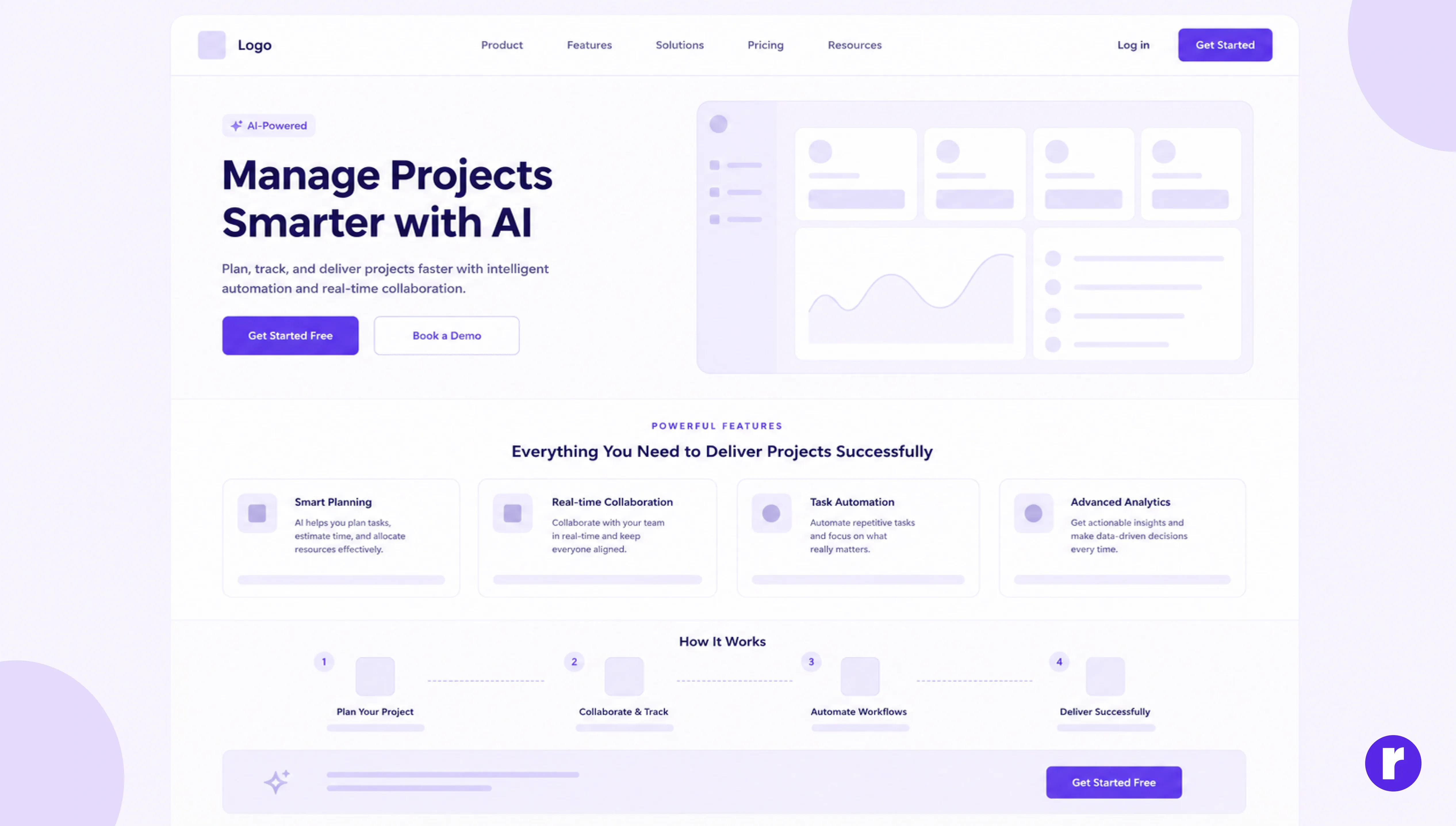
One of the most common challenges for designers is deciding what content should appear on a homepage and in what order.
AI can help structure content before any visual design begins.
Prompt used
- Role: Act as a senior website designer.
- Context: I am creating a homepage for an AI-powered project management platform that helps teams plan, collaborate, and track work efficiently.
- Audience: Startup founders, project managers, and remote teams.
- Goal: Create a homepage wireframe that clearly communicates value, builds trust, and encourages sign-ups.
- Constraints: Prioritize content hierarchy, conversion-focused messaging, clear CTAs, and mobile responsiveness. Avoid unnecessary sections.
- Output format: Provide a homepage wireframe structure with section order, content recommendations, CTA placement, and a brief UX rationale for each section.
Generate a complete user flow
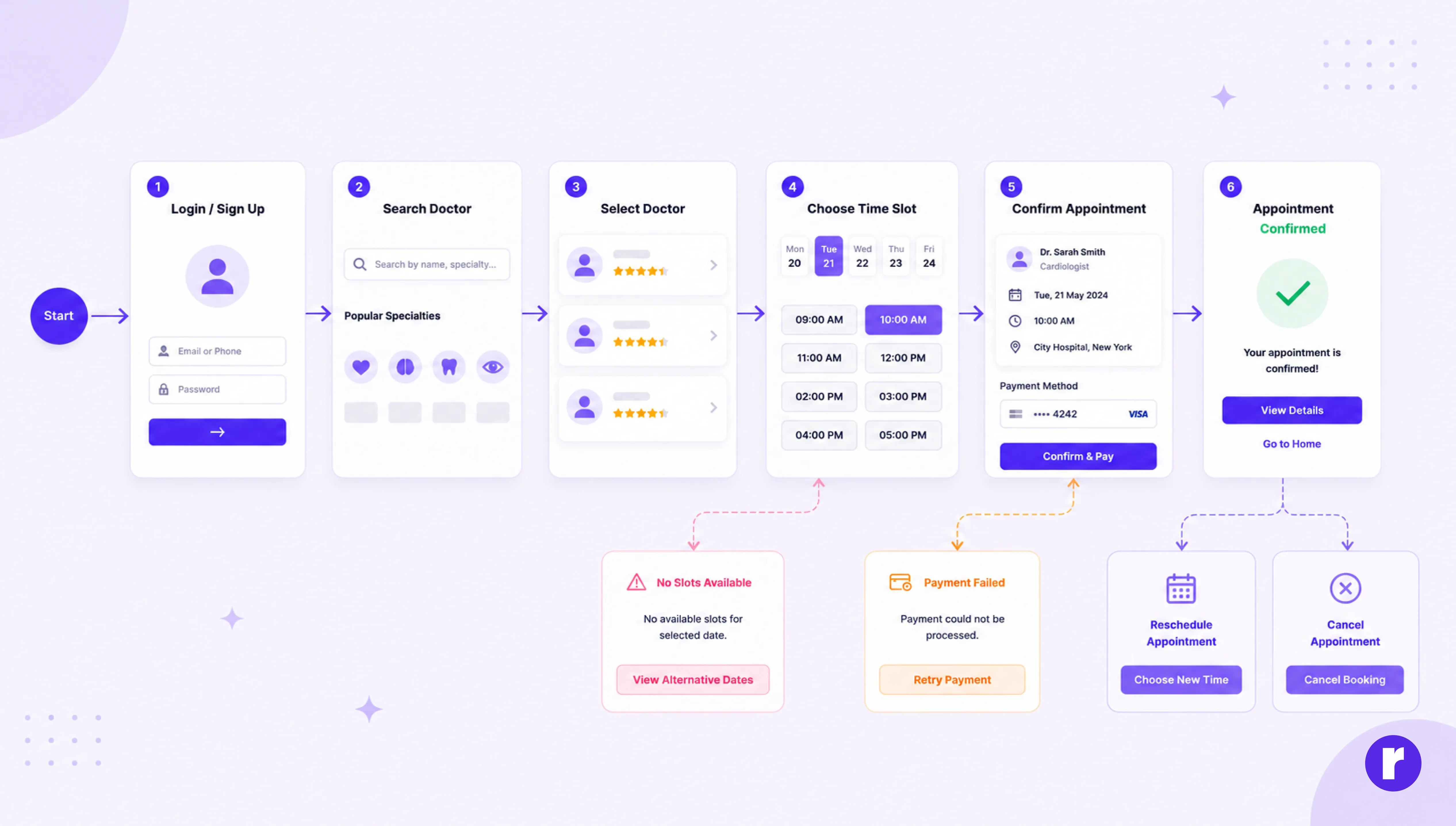
Many designers focus only on the "happy path," the ideal journey where everything goes perfectly.
However, real users encounter errors, abandon tasks, and make unexpected decisions.
AI can help identify those scenarios before wireframing begins.
Prompt used
- Role: Act as a senior UX designer.
- Context: I am designing a mobile application that allows users to book doctor's appointments online.
- Audience: Patients looking for a fast and convenient way to schedule healthcare appointments.
- Goal: Create a complete user flow that covers both successful and unsuccessful user journeys.
- Constraints: Include happy paths, error states, cancellation scenarios, recovery flows, drop-off points, and potential friction areas.
- Output format: Present the flow as a step-by-step journey diagram with explanations for each stage.
Explore how our design experts can help you build better digital experiences. Learn more at Radial Code
Create a user journey map
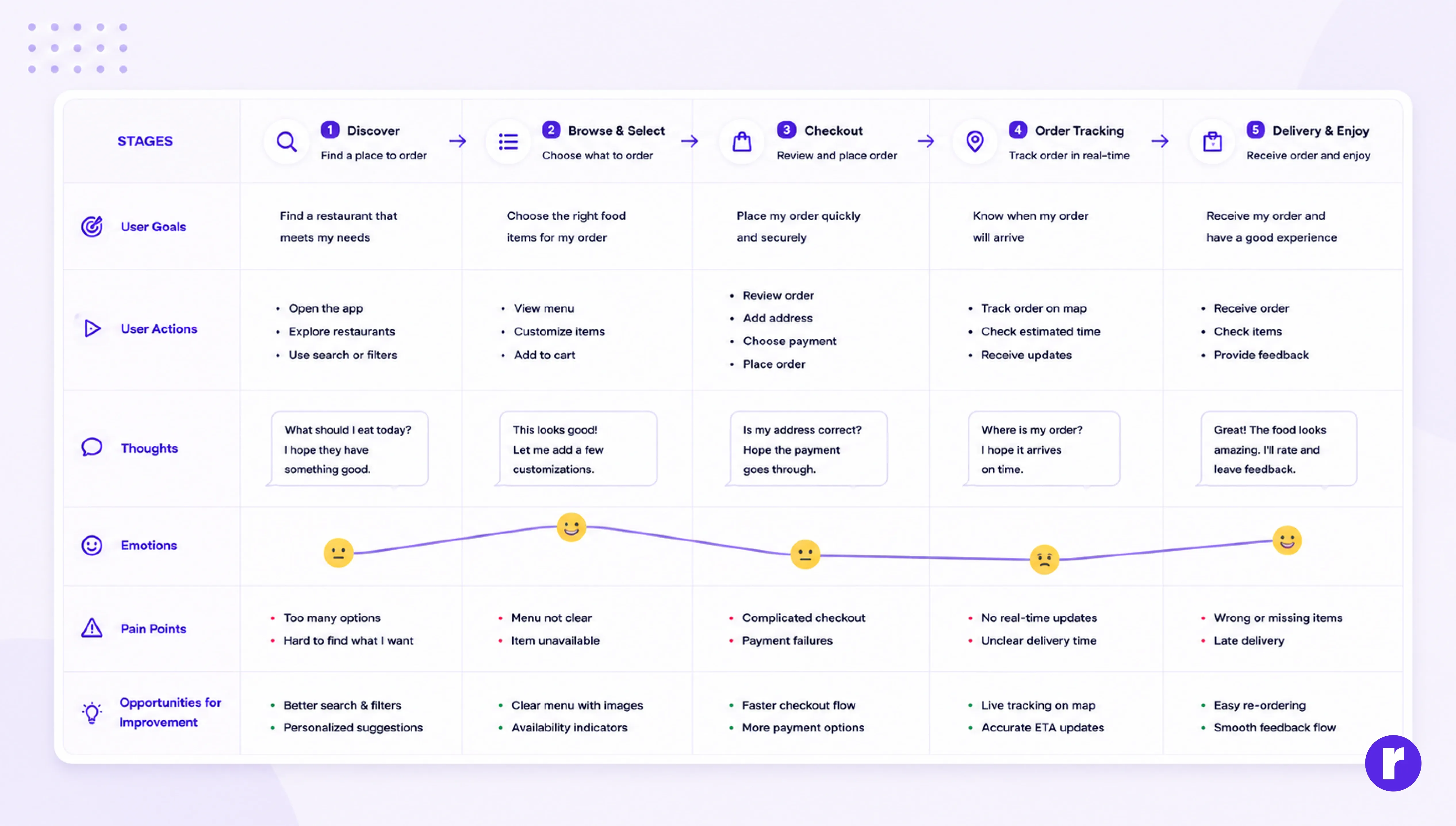
You want to understand the complete experience users go through before, during, and after interacting with your product.
Prompt used
- Role: Act as a senior UX designer.
- Context: I am designing a food delivery application and want to understand the end-to-end customer experience.
- Audience: Busy professionals who frequently order meals through mobile apps.
- Goal: Identify user needs, emotions, pain points, and opportunities for improvement throughout the journey.
- Constraints: Cover the stages before ordering, during ordering, and after receiving the order. Include both positive and negative experiences.
- Output format: Present the user journey map in a table with stages, user goals, actions, thoughts, emotions, pain points, and improvement opportunities.
Generate color & typography systems
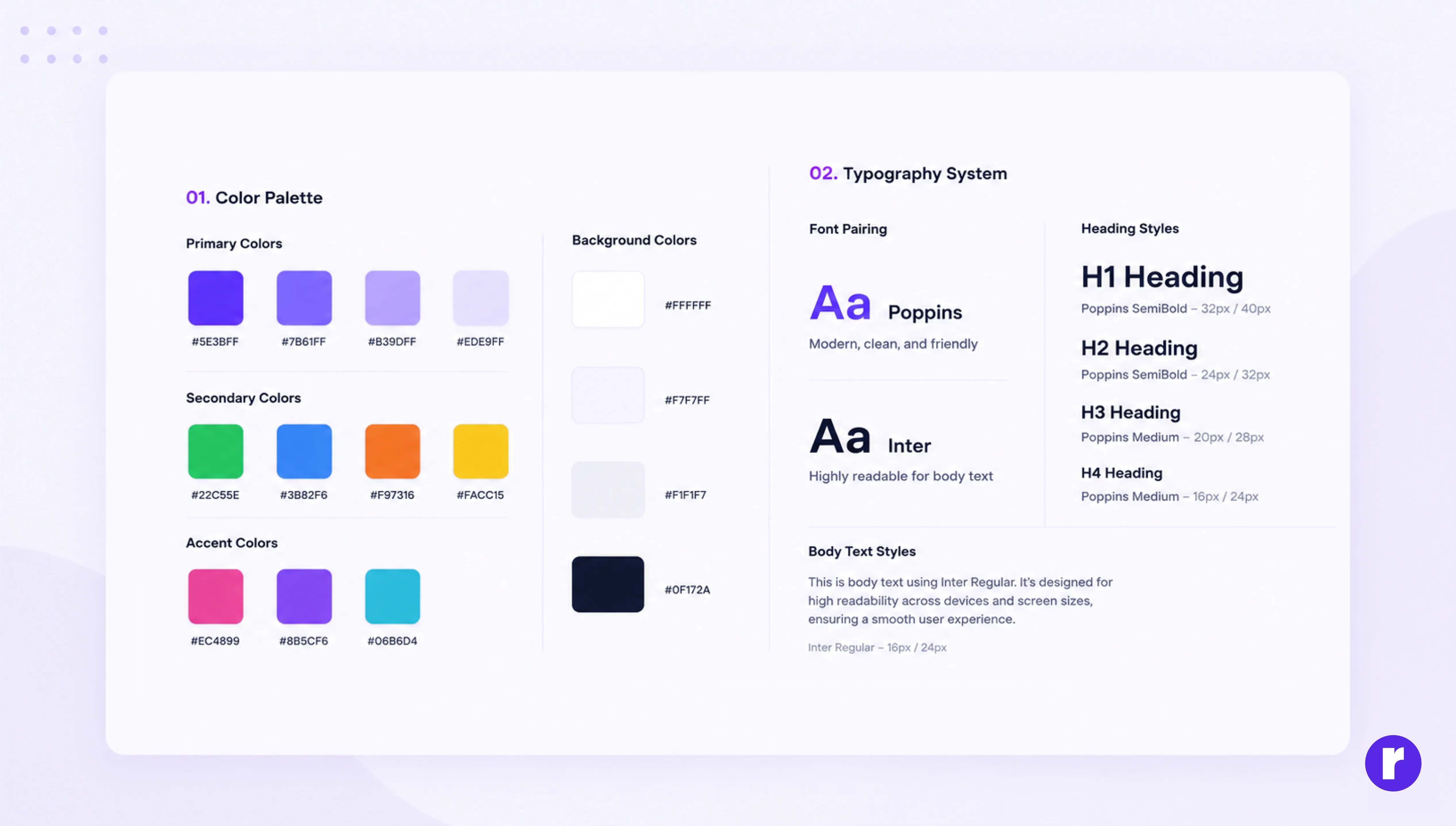
Use AI to quickly create color palettes, font pairings, and design systems that align with your brand and improve visual consistency.
Prompt used
- Role: Act as a senior UI designer and design systems expert.
- Context: I am creating a modern fintech mobile application focused on personal finance management.
- Audience: Gen Z users who value simplicity, trust, and modern digital experiences.
- Goal: Develop a visually appealing and accessible design system that strengthens brand identity and usability.
- Constraints: Ensure strong color contrast, accessibility compliance, mobile-first design, and consistency across all screens.
- Output format: Provide primary, secondary, accent, and background colors; typography pairings; heading styles; and body text styles, and explain the reasoning behind each design choice.
💡 Pro Tip: Use AI to explore unexpected font pairings and color combinations that you might not consider manually.
Common mistakes designers make with AI prompts
AI is powerful, but the quality of its output depends heavily on the quality of your instructions. Many designers try AI once, get poor results, and assume the tool isn't useful. In reality, the problem is often the prompt itself.
Let's look at some common mistakes and how to avoid them.
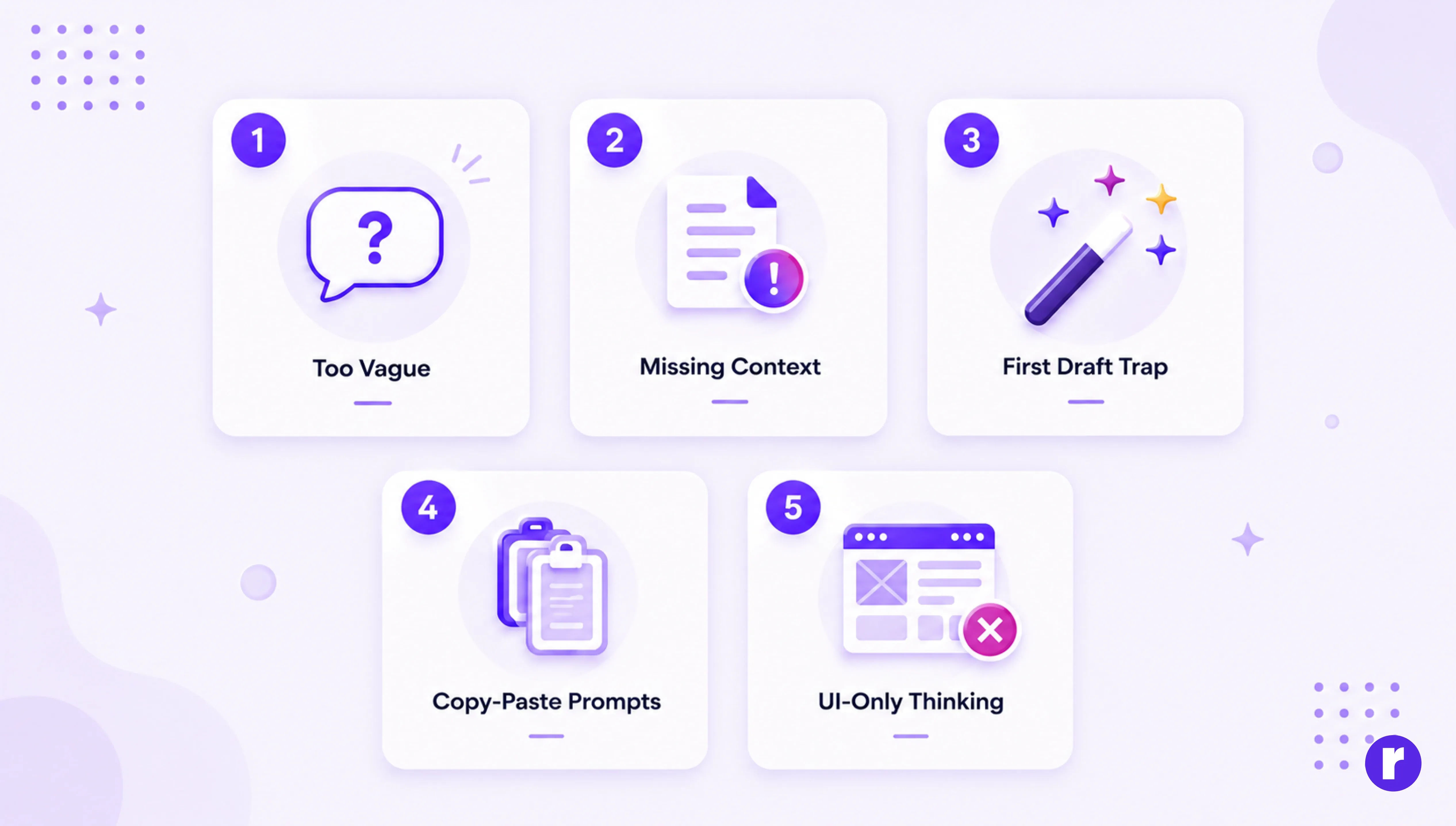
- Being too vague: "Make me a persona" tells AI nothing about your project, audience, or constraints. You'll get a template, not a tool.
- Not providing context: AI can't read your mind or your figma file. The more relevant context you share (research data, project briefs, target audience), the better the output.
- Accepting the first output: Treat AI output as a first draft, not a final deliverable. Iterate. Push back. Ask "make this more specific" or "challenge these assumptions."
- Copy-pasting without adapting: Prompts that work for one project won't automatically work for another. Always customize the context and constraints to your specific situation.
- Focusing only on UI: The strongest AI use cases often involve UX strategy, research, and problem-solving.
Best AI tools for UI/UX designers
AI tools can support every stage of the design process, from research and wireframing to prototyping and testing. Here are some of the most useful tools for modern UI/UX designers.
|
Tools |
Category |
Best for |
|---|---|---|
|
ChatGPT |
UX research & strategy |
Thinking, planning & problem solving |
|
Claude |
Research & documentation |
Deep analysis |
|
Figma AI |
Design assistant |
Faster design workflows |
|
Relume AI |
Website planning |
Sitemap & wireframes |
|
Lovable |
AI app builder |
Building full products from prompts |
|
Gemini |
AI assistant & research |
User research, personas & content creation |
Want to learn more about UI/UX designers? Visit Radial code
Conclusion
As AI continues to evolve, the ability to write effective prompts is becoming an important advantage for UI/UX designers. Strong prompts can help streamline research, spark creative thinking, improve UX content, and accelerate design workflows without sacrificing quality.
However, great design still depends on human insight, empathy, and decision-making. AI can generate ideas and suggestions, but designers are responsible for understanding users and choosing the right solutions.
Designers who learn to write better prompts won't be replaced by AI—they'll simply work faster, explore more ideas, and make better design decisions.