How to Give AI Coding Agents Better Frontend Context

Written by
Ankit Godara
Front End Developer

Keshav Saini
Front End Developer

Table of contents
Build with Radial Code
Share this


Give an AI coding agent a backend task—writing an idempotent database migration, scaffolding an authenticated Express route, or generating a TypeScript parser—and it usually gets it right on the first try. The feedback loop is straightforward: types either compile or they don't, unit tests pass or fail, and status codes are deterministic.
Frontend engineering is a completely different beast.
When you ask an agent to "build a responsive modal with our design system" things fall apart quickly. The agent invents custom hex codes instead of using your CSS variables. It writes 80 lines of custom flexbox math for a button rather than importing the <Button /> component already sitting in components/ui. Even worse, it writes code that compiles without a single TypeScript error, but renders completely broken on a mobile viewport because it has no visual feedback.
AI models are blind to the browser's rendering engine. They see code as an Abstract Syntax Tree (AST), not as computed box models, cascading styles, or interactive viewports. If you want coding agents like Cursor, Claude Code, or custom agentic CLI tools to write clean frontend code, you have to engineer their context specifically for the browser.
Why coding agents struggle with UI code
The reason agents struggle with frontend development comes down to three structural blind spots:
- No visual feedback loop: A compiler checks syntax, not appearance. An agent cannot visually inspect whether an absolute-positioned dropdown is clipped by an overflow: hidden parent container unless you supply visual or DOM verification.
- Design system invisibility: Unless an agent knows every available primitive in your repo, its default behavior is to reinvent the wheel. If it doesn't see your @/components/ui/dialog component in its active context window, it will build a brand new modal using raw <div> tags and inline styles.
- The CSS cascade and layout context: CSS depends on inheritance, specificity, and layout context. An agent inspecting an isolated file has no idea what global styles, reset rules, or inherited CSS variables exist upstream in the root layout.
Solving this requires shifting from vague prompt instructions to systematic context feeding.

Strategy 1: Expose a machine-readable component catalog
Most teams rely on fuzzy file searches to find components. This breaks down as codebases scale because token limits prevent reading every file. A better approach is generating a machine-readable component manifest. A lightweight script scans your UI directory and creates a compact catalog:
// scripts/generate-ui-manifest.ts
import fs from 'node:fs';
import path from 'node:path';

interface ComponentSummary {
  name: string;
  importPath: string;
  props: string[];
  description: string;
}

const UI_DIR = path.resolve(process.cwd(), 'src/components/ui');
const OUTPUT_FILE = path.resolve(process.cwd(), '.agent/ui-manifest.json');

function buildManifest(): void {
  const files = fs.readdirSync(UI_DIR).filter((f) => f.endsWith('.tsx'));

  const manifest: ComponentSummary[] = [];

  for (const file of files) {
    const content = fs.readFileSync(path.join(UI_DIR, file), 'utf-8');

    const rawName = path.basename(file, '.tsx');
    const name = rawName.charAt(0).toUpperCase() + rawName.slice(1);

    // Extract exported prop interfaces (including extends) and top-level JSDoc
    const propMatches = [...content.matchAll(/interface\s+\w+Props(?:\s+extends[^{]+)?\s*{([^}]+)}/g)];

    const props = propMatches.length
      ? propMatches[0][1]
          .split('\n')
          .map((line) => line.trim())
          .filter(Boolean)
      : [];

    manifest.push({
      name,
      importPath: `@/components/ui/${rawName}`,
      props,
      description: `Use for standard ${name} rendering. Do not recreate custom HTML primitives.`,
    });
  }

  // Ensure output directory exists before writing
  fs.mkdirSync(path.dirname(OUTPUT_FILE), { recursive: true });

  fs.writeFileSync(OUTPUT_FILE, JSON.stringify(manifest, null, 2));

  console.log(`Generated agent UI manifest with ${manifest.length} components.`);
}

buildManifest();
This generates a concise file that fits comfortably in a system prompt or rules file:
[
  {
    "name": "Button",
    "importPath": "@/components/ui/button",
    "props": [
      "variant?: 'default' | 'destructive' | 'outline' | 'ghost'",
      "size?: 'default' | 'sm' | 'lg' | 'icon'",
      "isLoading?: boolean"
    ],
    "description": "Use for standard Button rendering. Do not recreate custom HTML primitives."
  }
]
When the agent sees this manifest in its context, it stops generating arbitrary <button className="px-4 py-2 bg-blue-500 rounded text-white"> tags and instead writes <Button variant="default" size="sm">.
Strategy 2: Constrain styling through strict project rules
LLMs love inventing colors. If you ask for a "subtle slate border," an LLM might emit #e2e8f0, border-gray-200, or rgba(0,0,0,0.08). Over a few weeks, your codebase becomes a patchwork of inconsistent values.
Create a dedicated rules file (such as .cursorrules, AGENTS.md, or .github/copilot-instructions.md) that explicitly forbids ad-hoc styling and establishes clear boundaries.
Here is an example of frontend-specific agent constraints:
# Frontend Development Rules

## Component Discipline

- NEVER build custom UI primitives (buttons, inputs, dropdowns, dialogs, badges).

- Always check `.agent/ui-manifest.json` first. If a primitive exists,
  import it from `@/components/ui/[component]`.

- If an existing primitive lacks a variant, extend the primitive using `cva()`
  (class-variance-authority)—do not bypass it with inline styles.

## Design Token Enforcement

- NEVER use arbitrary Tailwind classes (e.g., `w-[327px]`, `bg-[#1a1a1a]`, `text-[13px]`).

- Use semantic color tokens:

  - Backgrounds: `bg-background`, `bg-card`, `bg-muted`

  - Text: `text-foreground`, `text-muted-foreground`

  - Borders: `border-border`, `border-input`

- Spacing: Restrict layouts to Tailwind standard scales (`gap-2`, `gap-4`, `p-4`).

## Layout Integrity

- Do not use fixed heights (`h-[600px]`) on content containers; use flexbox, grid, or `min-h-*`.

- Any modal or drawer must account for mobile viewports
  using dynamic viewport units (`dvh` instead of `vh`).
Tip: Do not write rules as vague philosophies like "write clean CSS." Use negative constraints ("NEVER use arbitrary hex codes") paired with positive alternatives ("Use semantic color tokens like bg-card"). LLMs follow explicit boundary conditions much more reliably.
Strategy 3: Feed runtime DOM and computed style snapshots
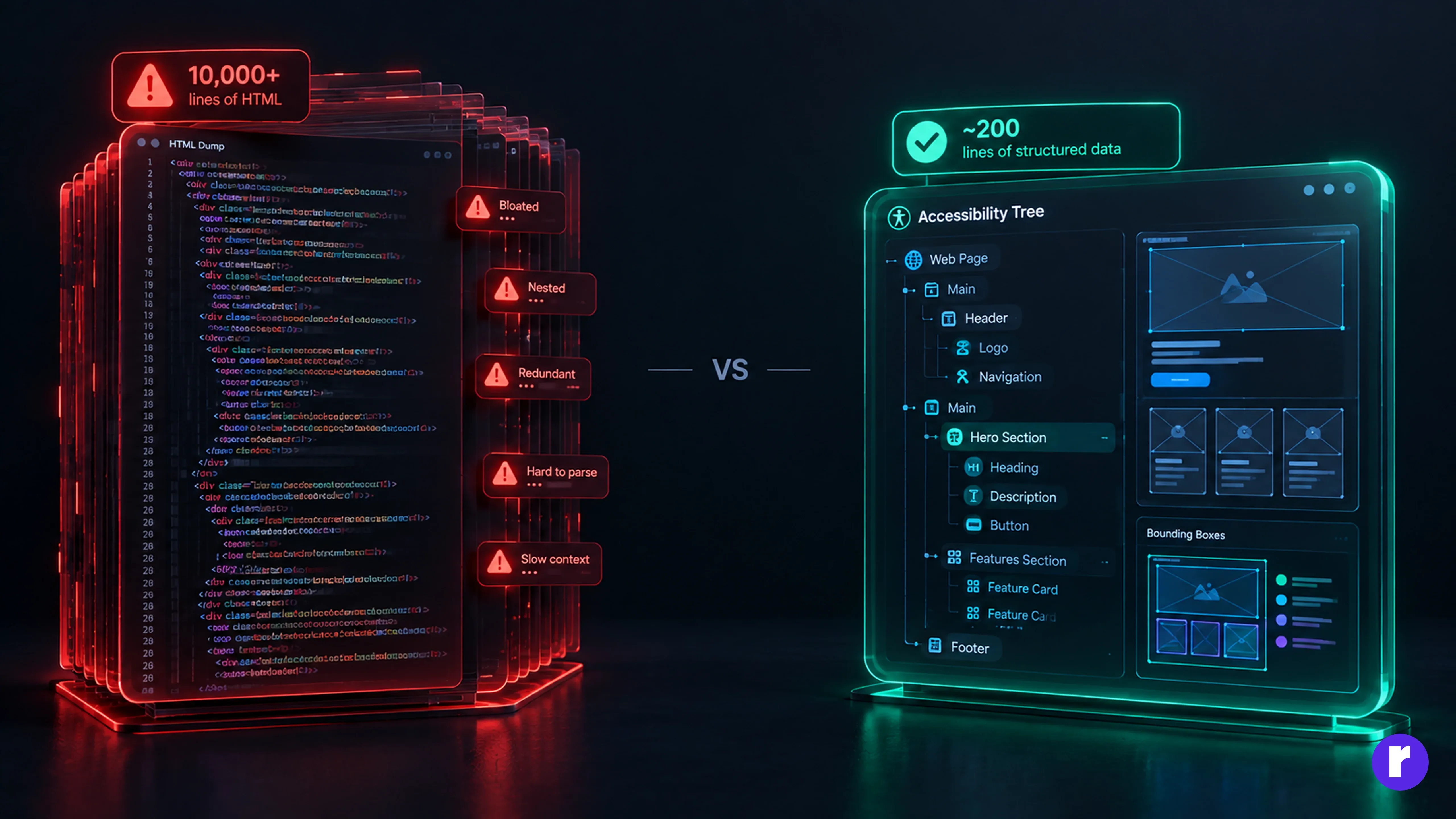
Code inspection only gets an agent halfway there. The biggest breakthrough in frontend agent performance comes from feeding the agent runtime feedback from a live browser session. Instead of pasting an entire HTML dump—which floods the model with thousands of noisy tokens—extract the ARIA snapshot and computed layout rects. Modern Playwright provides page.ariaSnapshot(), which returns a clean, compact YAML representation of the accessible roles, names, and states without the token bloat of raw DOM trees or deprecated verbose JSON snapshots.
Here is a Node.js utility using Playwright to extract a high-signal, token-efficient DOM representation for an agent:
// scripts/capture-agent-context.ts

import { chromium } from 'playwright';

export async function captureFrontendContext(url: string) {
  const browser = await chromium.launch();

  const page = await browser.newPage({ viewport: { width: 1280, height: 720 } });

  await page.goto(url, { waitUntil: 'networkidle' });

  // 1. Capture Accessibility Snapshot as compact ARIA YAML (Role, Name, State)
  const a11yTree = await page.ariaSnapshot();

  // 2. Extract broken layout elements (overflow or zero-dimension bugs)
  const layoutIssues = await page.evaluate(() => {
    const elements = document.querySelectorAll('*');
    const issues: string[] = [];

    elements.forEach((el) => {
      const style = window.getComputedStyle(el);

      // Skip hidden or off-canvas elements (e.g., collapsed drawers, hidden tabs)
      if (style.display === 'none' || style.visibility === 'hidden') return;

      const rect = el.getBoundingClientRect();
      const className = el.getAttribute('class') || '';

      // Detect horizontal overflow beyond viewport
      if (rect.right > window.innerWidth) {
        issues.push(`Overflow: <${el.tagName.toLowerCase()} class="${className}"> exceeds viewport (${Math.round(rect.right)}px > ${window.innerWidth}px)`);
      }
    });

    return issues.slice(0, 5); // Limit output to top issues
  });

  await browser.close();

  return {
    accessibilityTree: a11yTree,
    detectedLayoutIssues: layoutIssues,
  };
}
When you feed this payload into the agent's prompt during a debugging cycle, the agent doesn't have to guess why a drawer is invisible or why an input isn't receiving clicks. It sees:
{
  "detectedLayoutIssues": [
    "Overflow: <div class="flex w-[1400px] items-center"> exceeds viewport (1400px > 1280px)"
  ]
}
The agent immediately pinpoints the exact container causing the issue and adjusts the layout classes without touching unrelated components.
Common failure modes and how to fix them
Even with good context, agents stumble on specific frontend edge cases. Watch out for these three recurring patterns:
|
Failure Mode |
Root Cause |
Fix |
|---|---|---|
|
Component duplication |
Agent cannot find existing primitives |
Supply a lightweight ui-manifest.json indexed by component purpose. |
|
CSS specificity wars |
Agent injects !important to override upstream styles |
Explicitly ban !important in rules; force use of Tailwind variants or CSS modules. |
|
Responsive amnesia |
Agent designs exclusively for standard desktop (1280px) |
Force the agent to output mobile-first breakpoint styles (basethen md:/ lg:). |
Important: Always verify that your agent does not introduce client/server boundary bugs in modern frameworks like Next.js or Remix. Agents frequently forget 'use client' directives when adding hooks like useStateor useEffectto a server component file.
Structuring the developer workflow
Adopt this three-step cycle to keep context fresh:
- Seed the repo: Generate ui-manifest.json whenever UI primitives change, and keep rules files current.
- Task execution: Prompt the agent to construct UI by referencing existing tokens and components rather than arbitrary styles.
- Automated verification: Run a headless ARIA snapshot or local test suite (tsc --noEmit, eslint) before approving diffs.
Treating frontend context as a structured pipeline turns your agent from an unpredictable intern into an effective pair programmer that respects your design system.
Discover who we are and what we do — explore us.
Visit Here
Conclusion
AI coding agents are only as good as their constraints and feedback loops. Exposing a component manifest, enforcing design tokens with negative constraints, and feeding back runtime ARIA snapshots eliminates the blind spots behind inconsistent frontends. Put these three guardrails in place, and your agent will write dependable UI code on the first prompt.