7 UX principles every designer should master

Written by

Sumit Verma
UI/UX Designer
Table of contents
Build with Radial Code
Share this


Good UX design is not about adding more features, animations, or fancy visuals. Great UX isn't about making an interface easier to use after it's designed. It's about making the right decisions before the interface is even built. Whether you are designing a website, mobile app, SaaS product, or e-commerce platform, the same question always matters: Can the user understand what to do without having to think too hard? That is where UX principles come in.
UX principles give designers a practical foundation for making better design decisions. They help you understand how users behave, where they get confused, and what makes an interface feel effortless.
If you're learning UI/UX design or already working as a designer, these 7 UX principles can help you create interfaces that are not only visually appealing but also genuinely easy to use.
1. Design for user-centricity
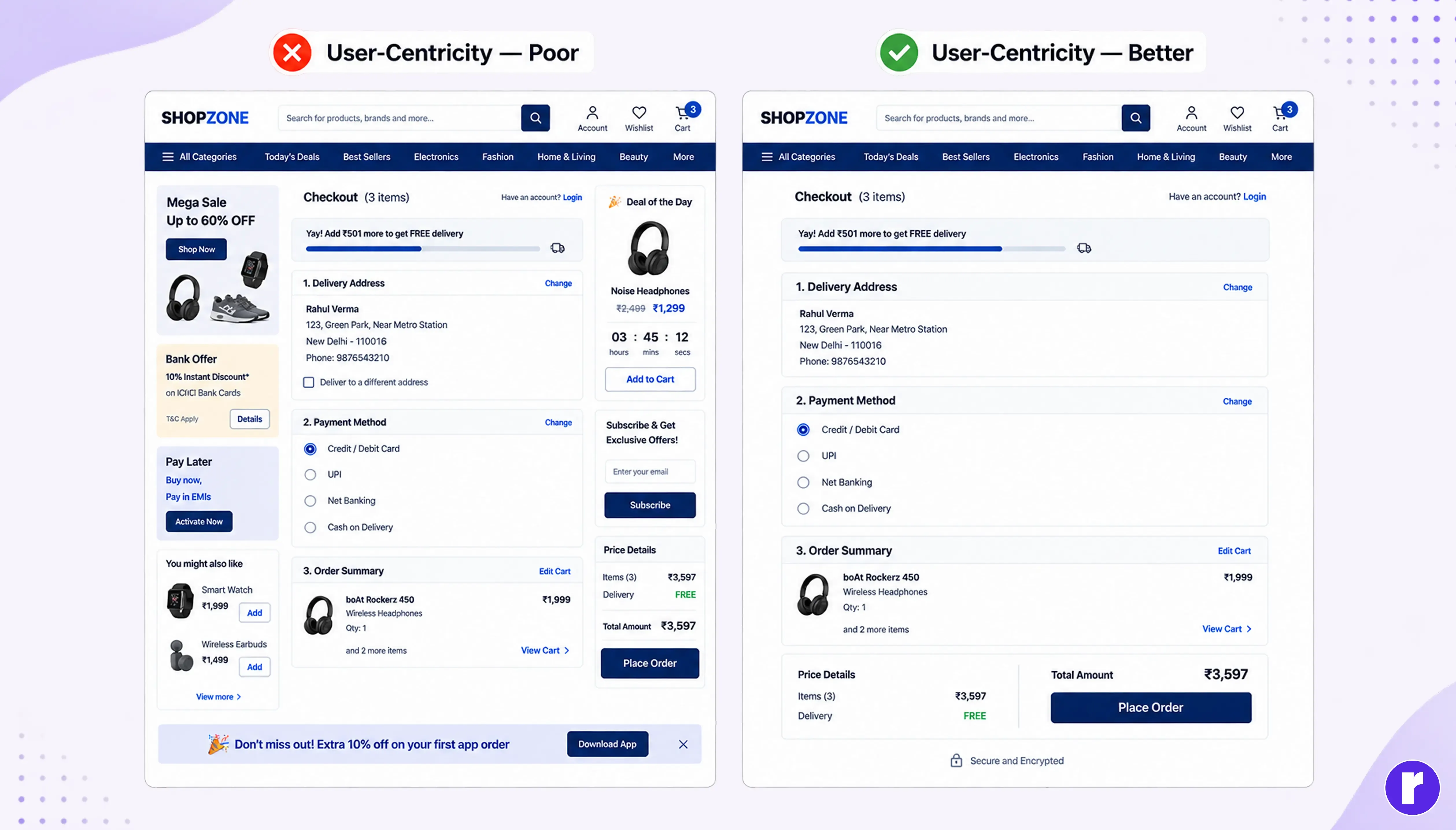
User-centricity means putting the user's needs, goals, behaviours, and expectations at the center of the design process. Instead of designing based on assumptions or personal preferences, designers should make decisions based on user research, behaviors, and goals.
How to apply it:
- Understand your target users before designing
- Identify their goals and pain points
- Use research to validate assumptions
- Design around real user tasks and behaviours
- Consider user expectations and goals
Pro tip: Whenever you're unsure about a design decision, ask: “What problem does this solve for the user?” If you can't answer clearly, rethink the decision.
2. Maintain consistency
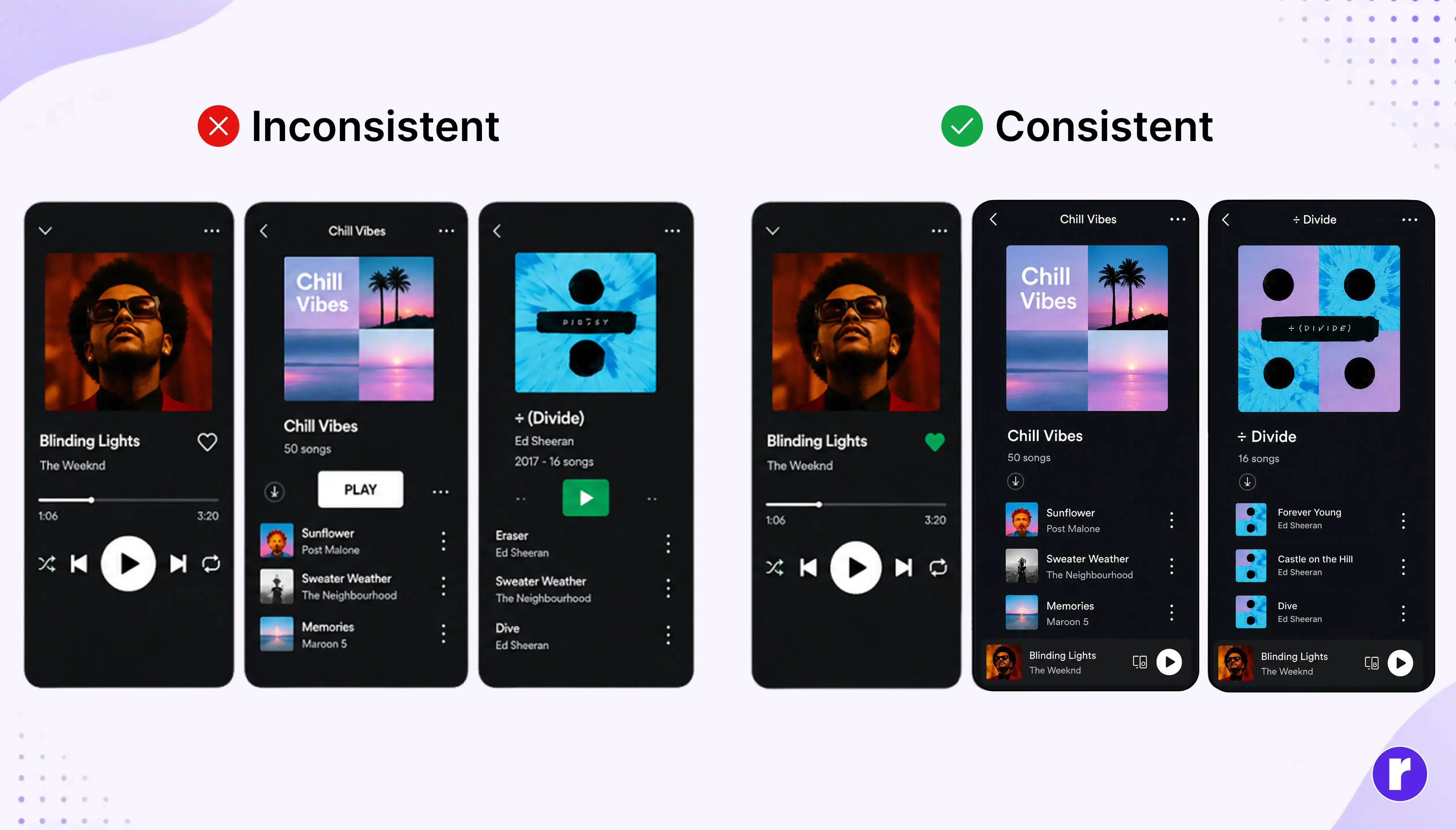
Consistency makes an interface easier to understand because users don't have to relearn how different parts of a product work. When similar elements look, feel, and behave in similar ways, the experience becomes more predictable. Consistency should exist across visual design, content, interactions, and functionality.
Keep these elements consistent:
- Buttons and interactive elements
- Typography and spacing
- Colors and visual styles
- Icons and illustrations
- Navigation patterns
- Terminology and labels
- Interaction states and feedback
Consistency doesn't mean every screen needs to look identical. It means users should be able to recognize patterns and understand how the product works as they move through it.
Turn thoughtful UX principles into intuitive, user-focused digital experiences with Radial Code
3. Create a clear visual hierarchy
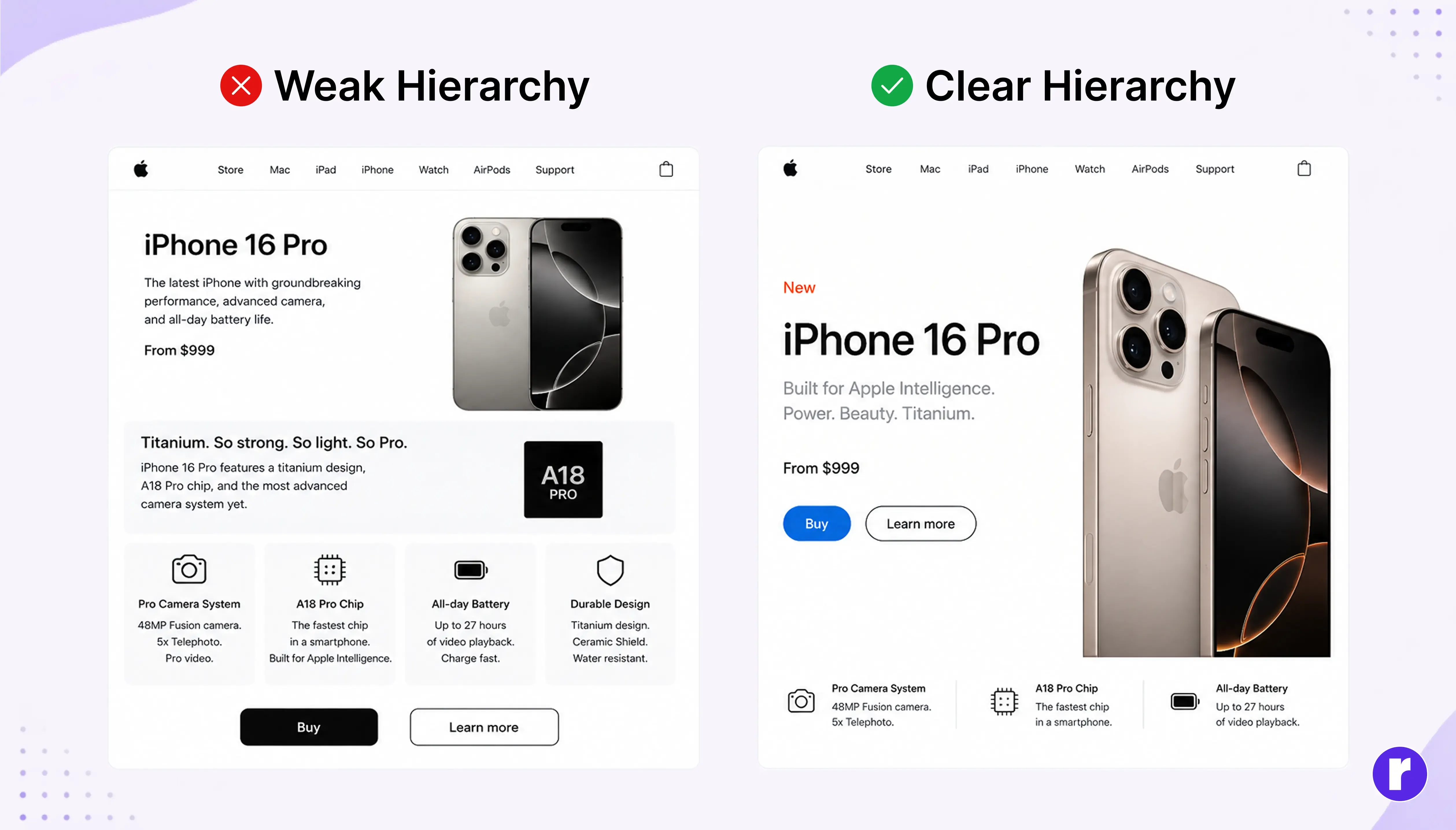
Even a beautiful interface can fail if users can't quickly identify what matters most. Good UX design creates a clear visual hierarchy so users immediately understand what deserves their attention first, second, and third.
Without it, every element can compete for attention, making the interface feel confusing or overwhelming.
You can create hierarchy using:
- Larger or bolder headings
- Different text weights
- Clear spacing between sections
- Appropriate contrast
- Strategic placement of important information
- Grouping related content
- Clear primary and secondary actions
Good hierarchy should also remain accessible: don't rely on color alone to communicate importance, and make sure text has sufficient contrast and readable sizing.
Pro tip: Look at your design from a distance or blur your screen slightly. The most important elements should still stand out from the rest.
4. Design for context
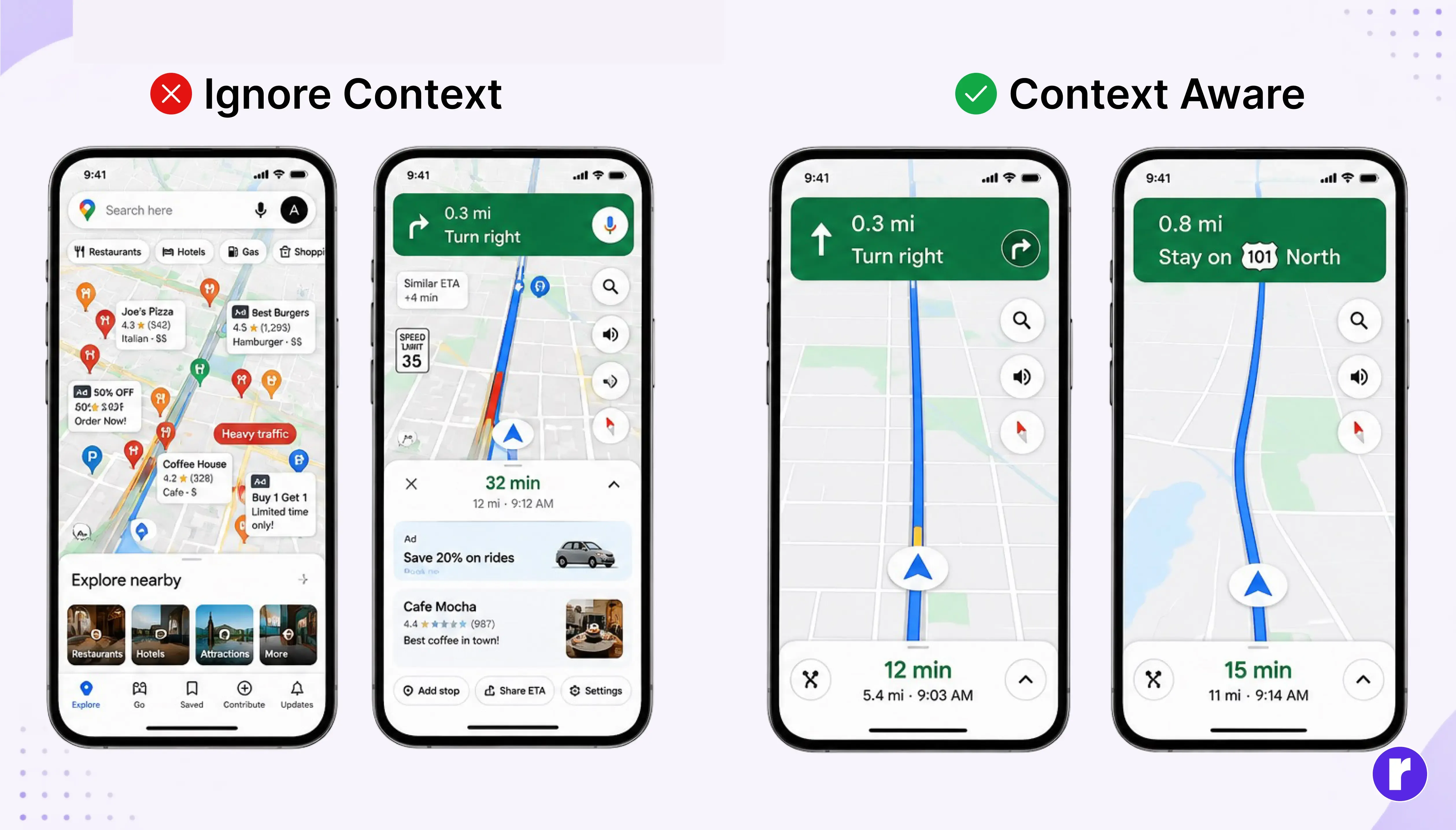
Users don't interact with products in a perfect environment. They may be using a website on a bright screen, checking an app while walking, or completing a task with limited time and attention.
Think about:
- Where the product will be used
- What device users are using
- What users are trying to accomplish
- How much time they have
- What information they need at that moment
Context-aware UX considers the situation in which the product will actually be used. Understanding context helps designers create experiences that fit naturally into users' real lives instead of designing only for an ideal scenario.
5. Give users control
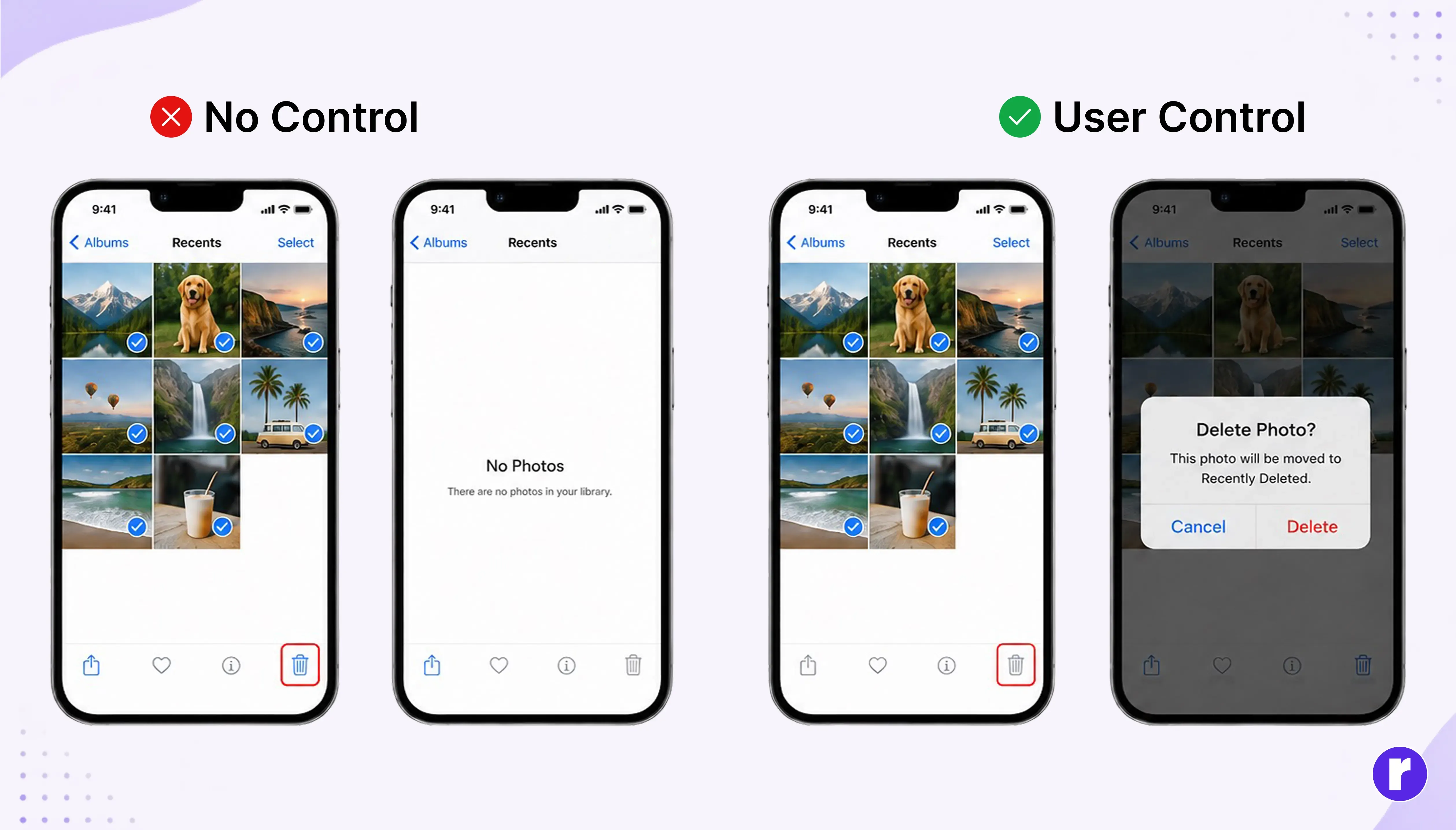
Users should feel in control of their actions and the interface. Good UX doesn't force users into unexpected actions or leave them wondering what happened. Giving users control means providing clear choices, allowing them to correct mistakes, and making important actions predictable.
Ways to give users more control:
- Provide Undo or Cancel options
- Allow users to go back when appropriate
- Ask for confirmation before important actions
- Clearly communicate what will happen next
- Let users manage preferences where relevant
- Avoid unexpected changes or automatic actions
User control is especially important when an action is irreversible, affects important information, or could have significant consequences.
Pro tip: Before finalizing an interaction, ask: “If the user changes their mind, what can they do?” A good experience should provide a reasonable way back.
6. Design for accessibility

Accessibility means creating digital experiences that can be used by people with different abilities, needs, and circumstances. Accessibility shouldn't be treated as an optional feature added at the end of a project.
A well-designed interface should consider users who may have visual, auditory, motor, cognitive, or other accessibility needs.
Consider accessibility by focusing on:
- Readable typography and appropriate text sizes
- Sufficient color contrast
- Keyboard-friendly interactions
- Clear labels and instructions
- Alternative text for informative images
- Visible focus states
Accessibility also improves the experience for people without permanent disabilities. Someone using a phone in bright sunlight, wearing headphones in a noisy environment, or using one hand can benefit from accessible design too.
7. Prioritize usability
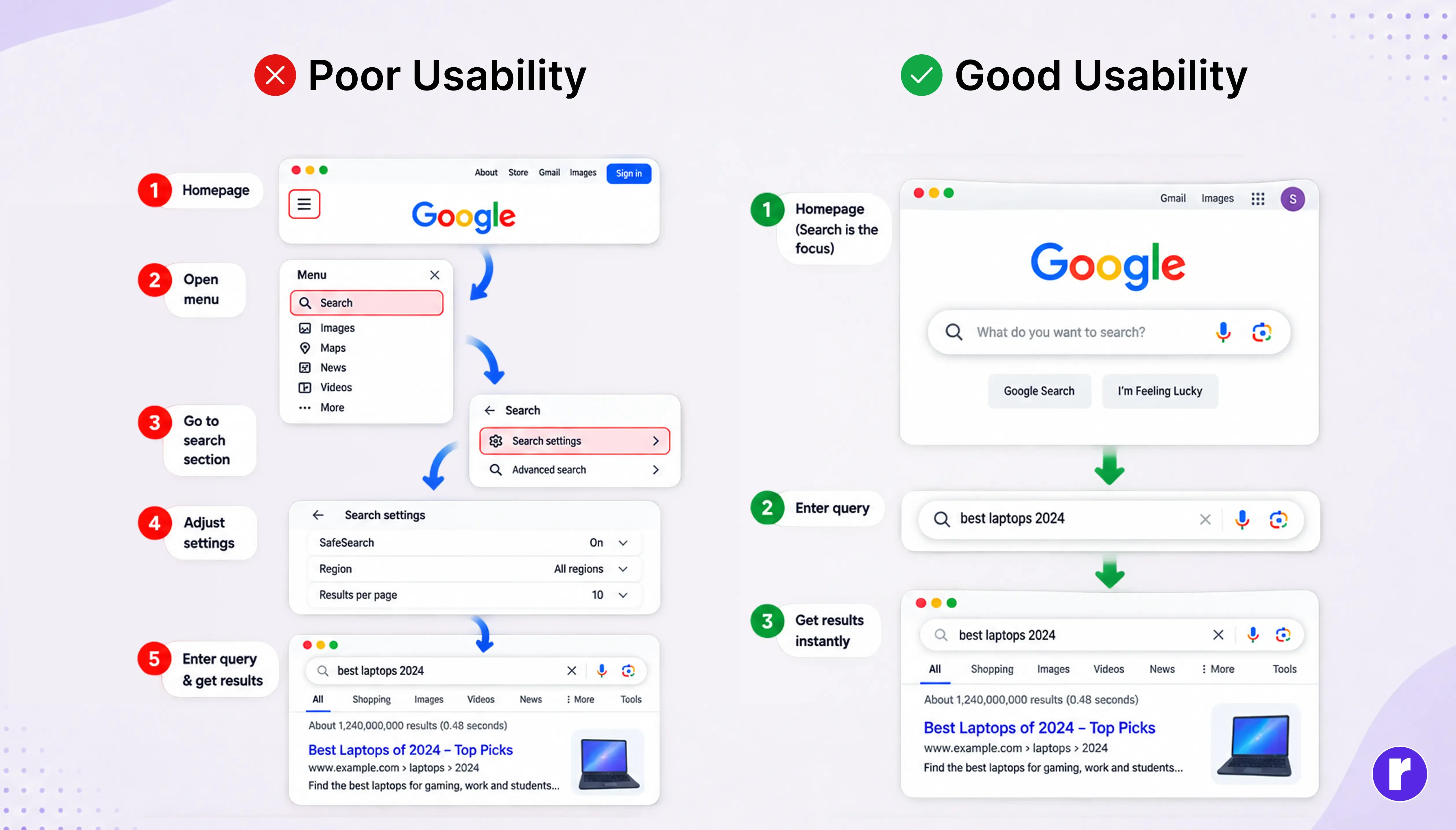
Usability is about how easily and effectively users can accomplish their goals with a product. A visually impressive interface isn't successful if users struggle to understand or operate it.
Good usability means users can learn the interface, complete tasks efficiently, and recover when something goes wrong.
To improve usability:
- Make important tasks easy to find
- Use language users understand
- Keep interactions predictable
- Reduce unnecessary steps
- Make information easy to scan
- Provide helpful guidance when needed
- Test designs with real users
Usability testing can reveal problems that designers may overlook because they already understand how the interface works.
Pro tip: Watch someone unfamiliar with your design use it without helping them. Their hesitation, mistakes, and questions can reveal usability issues faster than simply reviewing the design yourself.
Why these UX principles matter
UX principles aren't rules that designers follow mechanically. They provide a way to evaluate design decisions and understand whether an experience is actually working for the people who use it.
From creating a simple mobile interface to designing a complex enterprise platform, these principles help designers think beyond aesthetics and focus on the overall user experience. Strong UX design brings together:
User needs + Business goals + Usability + Visual clarity
When these elements work together, users can understand the product, complete their goals, and interact with it with less effort and frustration.
These principles aren't separate checkboxes. They form a system: user-centricity defines who you're designing for, context explains when and where they use the product, consistency and hierarchy guide how they navigate it, while accessibility, control, and usability determine how confidently and efficiently they can complete their goals.
Conclusion
Great UX doesn’t need to scream for attention. The best experiences often feel almost invisible because users can accomplish their goals without unnecessary confusion or friction.
The goal isn't to make users think unnecessarily about the interface; it's to help them focus on what they came to accomplish. So, instead of asking “How can I make this look better?”, ask “How can I make this easier?” To learn more about UI/UX, visit our website here.