How to use AI to speed up your design workflow

Written by

Chandani Sahani
UI/UX Designer
Table of contents
Build with Radial Code
Share this


Design has always been a race against time. Turning an idea into a polished, review-ready experience has traditionally taken days—or even weeks—of research, iteration, and refinement. Today, artificial intelligence is helping designers accelerate many parts of that process. Tools like ChatGPT and Claude can summarize research, generate UX copy, and organize documentation in minutes, while Midjourney and Adobe Firefly help teams explore visual directions faster than ever. However, successful design isn't about handing the work over to AI. It's about knowing where AI can accelerate the process and where human creativity, strategic thinking, and design judgment remain essential.
This shift is reflected across the creative industry. According to Adobe's 2024 State of Creativity Report, creative professionals are increasingly using generative AI to improve productivity, accelerate ideation, and streamline creative workflows.
Curious about AI's impact on UI/UX design? Will AI Replace the UI/UX Designer? An Honest Look at Our Evolving Role.
How AI Helps Designers Read Documentation Faster
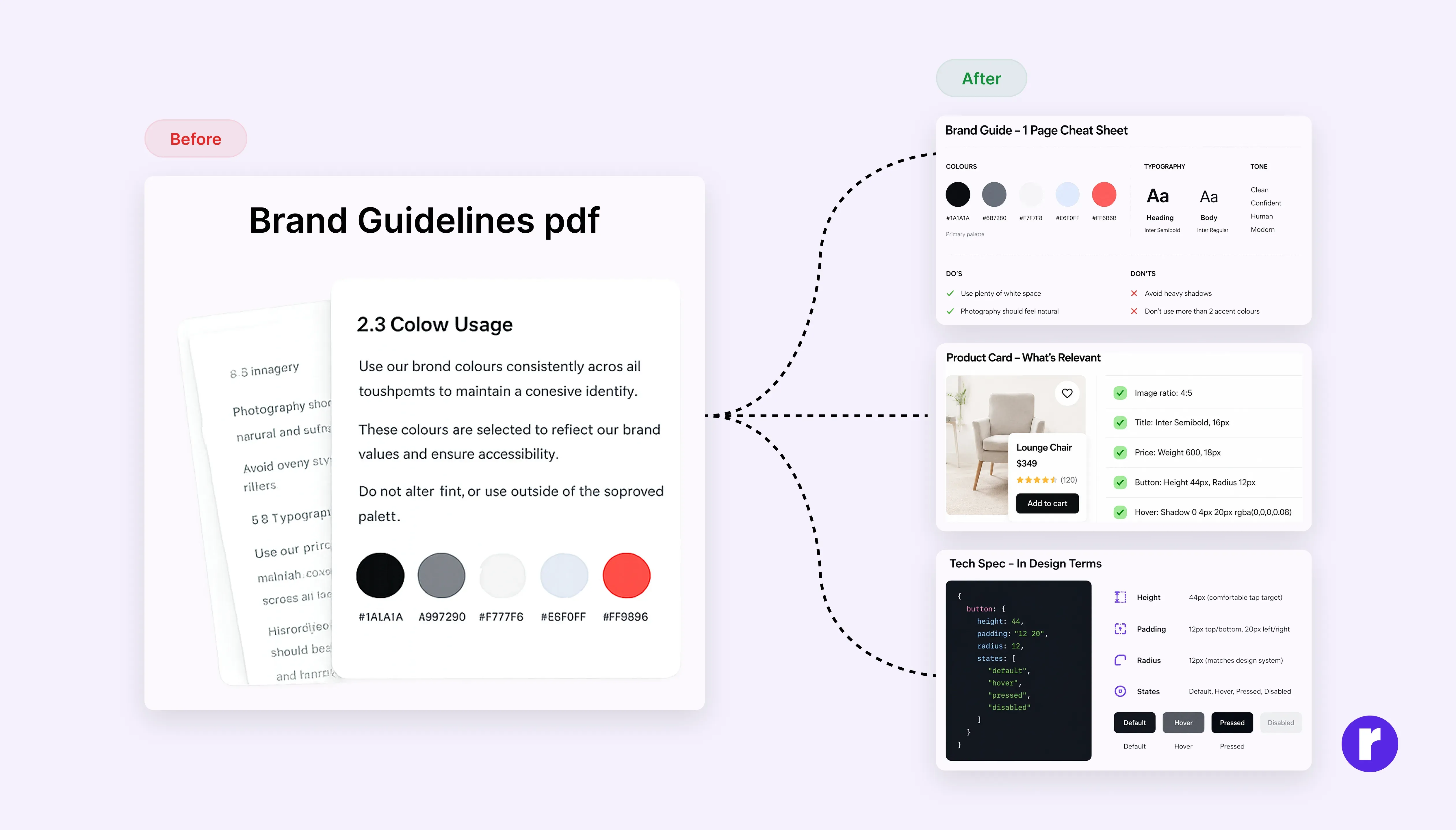
Every designer has been there — you need to understand a component library, a brand guideline PDF, or a developer's technical spec, and it's 40 pages long. You don't need all of it, you just need the part that's relevant to what you're building right now. That's exactly where AI earns its place.
Paste a documentation section into a language model and ask it to pull out only what applies to your current component or screen. Ask it to summarize a brand guide into a one-page cheat sheet you can keep open while you work. If a developer sends over a technical spec written in language that doesn't map to design thinking, ask AI to translate it — what does this mean for spacing, states, and edge cases?
Remember: AI summaries can help you understand documentation more quickly, but they may omit important implementation details, exceptions, or edge cases. Review the original documentation before making important design or development decisions.
Privacy tip: Remove personal, client-confidential, and proprietary data before uploading documents to an AI tool. Always follow your organization's AI policy and use only approved AI tools when handling sensitive information.
Using AI for UX Research and Design Inspiration
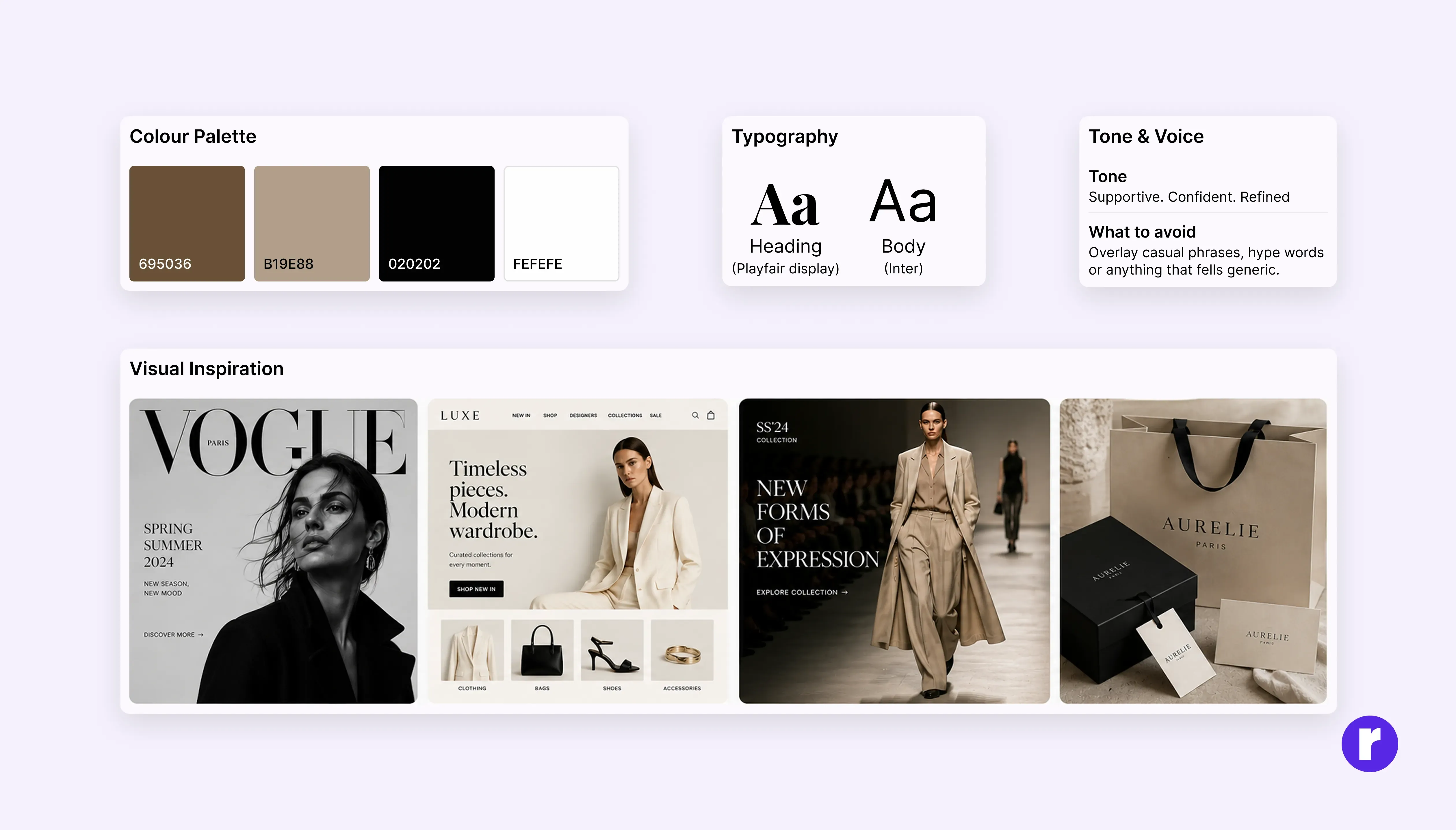
Research in design is more than just reading articles. Before opening Figma, designers need to find the right references, understand their users, and explore different visual directions. This is where AI tools can save a lot of time and help teams make better design decisions.
- Explore tools like Gemini, Claude, or Perplexity to discover design trends, visual styles, and references outside your usual inspiration sources.
- Experiment with Midjourney or Adobe Firefly to quickly generate mood directions and explore different creative concepts before starting the actual design.
- ChatGPT or Perplexity can help summarize existing research and industry insights to create initial hypotheses before designing. Always validate your findings with real users and credible sources.
Interested in learning more about our approach to design and digital products? Explore more insights from Radial code
Licensing tip: Before using AI-generated images in commercial projects, review the licensing, ownership, and commercial-use terms of the tool you're using to ensure the assets can be used as intended.
Use AI to expand the possibility space, not collapse it

One of the most powerful uses of AI in the early stages of design is generating ideas quickly. When exploring visual directions for a brand, campaign, or product interface, designers often run out of ideas before they find the right one. AI helps remove that limitation by giving you multiple starting points in minutes.
- Explore creative directions using tools like Midjourney, Adobe Firefly, or Ideogram to quickly generate moodboards and concept references that explore different color palettes, visual styles, and creative directions. Use these outputs as inspiration rather than validated interface layouts or typography systems.
- ChatGPT, Claude, or Gemini can generate multiple versions of UX copy, headlines, and CTAs for testing and refinement.
- Perplexity or ChatGPT can help brainstorm and summarize publicly available competitor information. Treat AI-generated summaries as a starting point, not a substitute for original research. Always verify important findings using primary sources such as company websites, product documentation, and direct product testing before making design decisions.
"Prompt AI the way you would brief a junior designer — be specific about tone, audience, constraints, and what you want to avoid. Vague prompts return vague output. The quality of AI ideation is directly proportional to the clarity of your creative brief."
Let AI handle the mechanical, not the meaningful
Once a direction is locked, the production phase begins—and this is where AI delivers some of its biggest time savings. Since many production tasks are repetitive and rule-based, AI and productivity tools can reduce production time. However, every output still requires human review to ensure accuracy, consistency, and quality.
- Use productivity plugins like Content Reel to quickly insert placeholder text, images, icons, and other sample content. Use Rename It to rename layers in bulk and maintain consistent naming conventions across large Figma files.
- Adobe Photoshop's Generative Fill is useful for creating presentation assets, extending backgrounds, removing distractions, and producing supporting visuals for design mockups.
- Figma AI can help generate UI layouts, rewrite text, or quickly explore interface variations before refining them manually.
Where Human Designers Still Matter Most
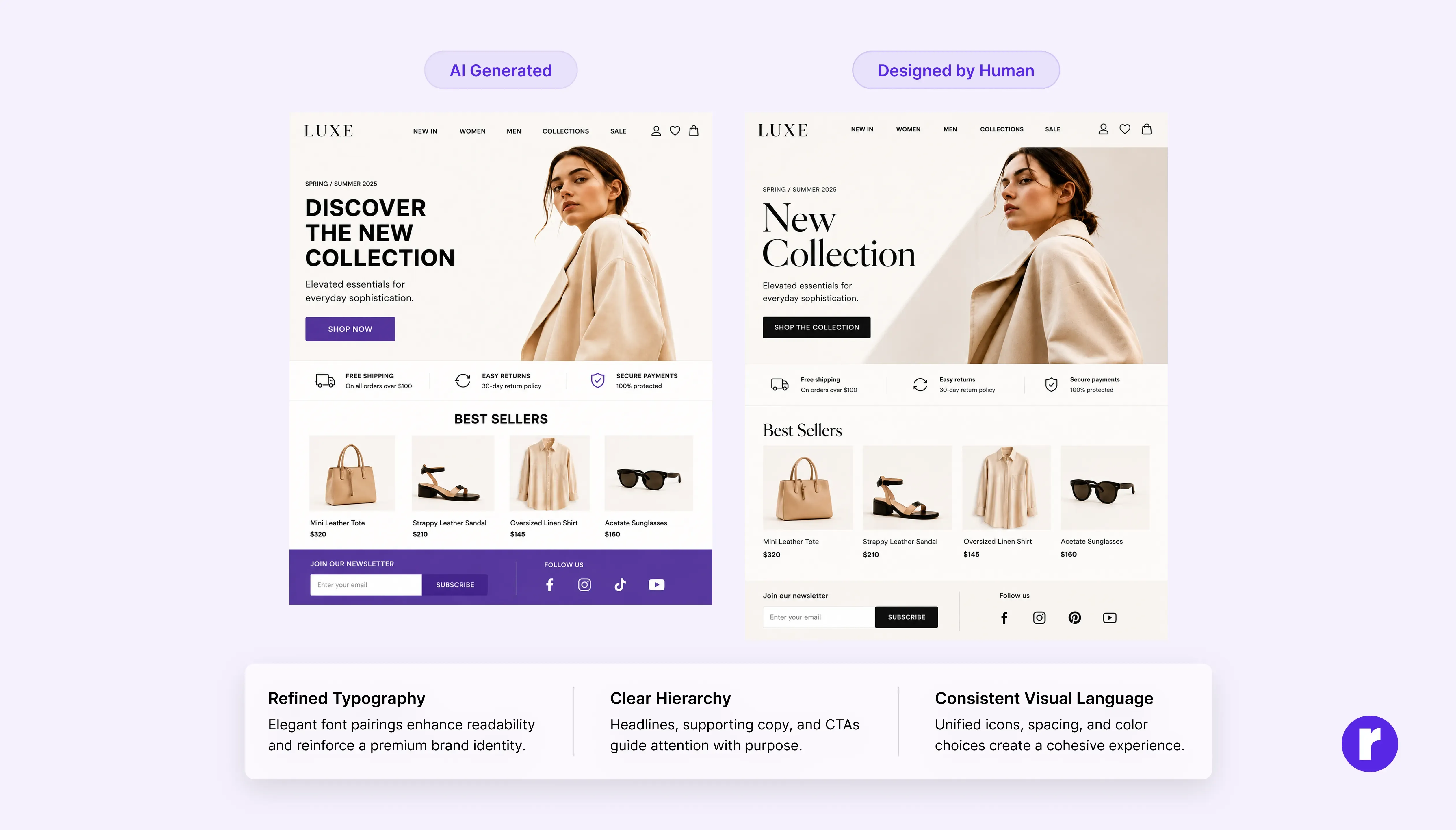
AI is excellent at generating ideas and speeding up the design process, but it can imitate brand voice and emotional styles while lacking the strategic judgment and contextual understanding needed to define them. It can produce work that looks polished and technically correct, yet still lacks a unique perspective.
Use AI to generate possibilities, but let your own judgment shape the final result. The strongest designs come from thoughtful decisions that give a brand a clear identity and create a lasting connection with its audience.
The designer's irreplaceable contribution is not the ability to produce — it is the ability to decide.
A Simple AI-Assisted Design Workflow
AI delivers the most value when it supports each stage of the design process rather than replacing it. A typical AI-assisted workflow might look like this:
- Research: Summarize user research, competitor information, and documentation with AI to build a strong understanding of the problem.
- Ideation: Generate moodboards, explore visual directions, and brainstorm creative concepts using tools like Midjourney, Adobe Firefly, or ChatGPT.
- Wireframing: Explore UI layouts and interface variations with Figma AI before refining them manually.
- Copywriting: Draft UX copy, headlines, and CTAs with AI, then edit them to match your brand voice and user needs.
- Human Review: Validate research, refine designs, test with users, and make the final creative and strategic decisions before launch.
Conclusion
AI has changed how quickly we design, but not what makes great design. Strong design is still purposeful, clear, and meaningful. The real advantage comes from using AI to remove repetitive work while relying on human creativity, judgment, and originality to shape the final result. The future of design isn't about humans or AI replacing each other—it's about combining the strengths of both.
Browse more articles on UI/UX design, AI, branding, and digital creativity at Radial code learn.